
Telling Time Clock Game
Play a free telling time game right in your browser, built around a real analog clock, not a text quiz. Set the Clock has you drag the hour and minute hands to match a target time; Read the Clock shows a clock face and asks you to pick the matching time; Time Challenge mixes both. Choose Hours, Half Hours, Quarter Hours, or 5-Minute Intervals. It's a real clock game, with no sign-up and nothing saved.
This free telling time game's core interaction is a real analog clock: drag the hands (or use the +/− buttons) to set a target time, with the hour hand moving proportionally as the minutes change, exactly like a real clock. Read the Clock flips it around — read a clock face and pick the matching time. Four levels build from whole hours to 5-minute intervals.
Drag the clock hands to match the target time.
Not a test — nothing is saved after you leave.
Ready to practice?
Drag the clock hands, or use the +/− buttons, to match each target time.
How to use the telling time clock game
- 1Choose Set the Clock, Read the Clock, or Time Challenge, and a level.
- 2In Set the Clock, drag the clock hands (or use the +/− buttons) to match the target time, then submit.
- 3In Read the Clock, read the clock face shown and tap the matching time.
- 4See instant feedback and your streak, then move to the next item automatically.
When this is useful
Learning to read an analog clock
Build real clock-reading skill with a genuine analog face, not just a multiple-choice question.
Setting a clock to a target time
Practice the hands-on skill of moving both hands correctly, with the hour hand tracking the minutes.
Classroom telling-time practice
Put a Read the Clock round on the projector for a whole-class warm-up.
Progressive difficulty
Start at whole hours and work up to 5-minute intervals as students get comfortable.
Home and tutoring practice
Parents and tutors can run a quick round with no printing, no prep, and no account.
Examples to try
Level 1: Hours
Whole-hour times only — a gentle starting point for new clock readers.
Level 2: Half hours
Times like 3:30, where the hour hand sits noticeably between two numbers.
Level 3: Quarter hours
Quarter-past and quarter-to times, a common early telling-time milestone.
Level 4: 5-minute intervals
Every 5-minute mark on the dial, for students ready for precise reading.
Tips for better results
Start with Set the Clock at Level 1
Dragging the hands to whole hours builds comfort with the interaction before adding minute precision.
Watch the hour hand move as you drag the minutes
The hour hand shifting between numbers as minutes change is one of the trickiest telling-time concepts — the game shows it happening live.
Use Read the Clock to check real recognition
Reading a clock face without touching it tests recognition independent of the hands-on setting skill.
Try Time Challenge once both skills feel solid
Mixing setting and reading in one round is a good check that a level has really been mastered.
How the telling time clock game works
Set the Clock gives you a target time and a live, draggable analog clock. Drag near the hour or minute hand (or use the +/− buttons) to move it; the hour hand always moves proportionally with the minutes, exactly like a real clock, and dragging the minute hand past 12 correctly advances or reverses the hour.
Read the Clock shows a clock face at a fixed time and four time options to tap — one exact match and three genuine, plausible times at the same level, never a trick question.
Each level changes only how finely the clock allows a time to be set or asked about — hours, half hours, quarter hours, or 5-minute intervals — so the same real clock face is used throughout, just at a different precision.
Private by design
- No account and no sign-up. Just open it and start.
- Everything runs on your device, which keeps the clock hand positions you set private.
- Nothing you create is uploaded. No values, names, scores, or generated content are sent to our servers. If you're signed in, My Classeem's Recent Activity notes which tools you used — never what you did in them.
- We use Google Analytics for anonymous, aggregate measurement: page views and a few usage events, such as a worksheet being printed or a game round starting or finishing (with the mode played). It never receives what you enter — no answers, scores, names, or generated content.
Frequently asked questions
Is this telling time game free?
Yes, completely free, with no account and no limit on how many rounds you play. There are no ads.
Do I have to drag the clock hands?
No. Small +/− buttons next to the clock move the hour and minute hands the same way dragging does, so the game is fully playable without a mouse or touchscreen drag.
What's the difference between Set the Clock and Read the Clock?
Set the Clock gives you a target time and asks you to move the clock hands to match it. Read the Clock shows a clock face and asks you to pick the matching time from four options.
Does the hour hand move correctly as the minutes change?
Yes. The hour hand's position always reflects both the hour and the minutes — for example, at 3:30 it sits exactly halfway between 3 and 4, never jumping only on the hour.
What levels are available?
Hours, Half Hours, Quarter Hours, and 5-Minute Intervals, each building on the last for a natural difficulty progression.
Does this use AI?
No. This is a browser-only game with exact clock-angle math. It does not use AI, and the game runs on your device.
Is it good for early telling-time practice?
Yes. Hours and Half Hours suit early learners, while Quarter Hours and 5-Minute Intervals suit students ready for more precise reading.
Are scores saved?
No. Your score, streak, and session best stay in your browser for the current session and are cleared when you leave the page.
More classroom tools
Elapsed Time Game
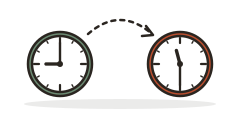
Jump along a time line from a start clock to an end clock, add up the hours and minutes, or move a clock forward or back by a given time.
Telling Time Worksheet Generator
Make printable analog clock worksheets: read the time or draw the hands, with an answer key.
Analog Clock Face Worksheet Generator
Print blank clock faces, draw-the-hands, read-the-clock, and analog-to-digital matching worksheets with an answer key.
Always free · No account needed · Nothing you type leaves your device unless you choose to save it.